Tracking across multiple AI platforms? This guide covers Perplexity specifically. For the multi-platform workflow across ChatGPT, Claude, and Perplexity together, see How to Track AI Brand Mentions Across ChatGPT, Claude & Perplexity.
Perplexity brand tracking is the practice of monitoring how Perplexity mentions, recommends, and cites your brand across its search answers.
Perplexity describes itself as an AI-powered search engine that searches the web in real time. Its answers include citations and links to original sources. That makes Perplexity uniquely measurable compared with many chat style AI experiences, but it is important to separate three different things:
- A mention is text in the answer that names your brand.
- A citation is a linked source Perplexity uses to support the answer.
- Referral traffic only happens if a user clicks a citation link. A citation or mention is not automatically a visit.
This guide covers what to track, how to do it manually, when to automate, and how to connect tracking data to content decisions. It uses a fictional brand called Planway, a mid-market project management tool, for illustrative examples.
Why Perplexity tracking needs its own approach
If you are already tracking visibility across AI platforms, Perplexity deserves separate treatment because its product mechanics affect what you can measure and how quickly results can change.
Perplexity searches the web in real time
Perplexity positions itself as a real-time web search experience. That means your visibility can shift after you publish, update, or restructure a page, and it can also shift when competitors publish something new or when the web results Perplexity retrieves change.
From a tracking standpoint, the practical implication is not that results change on a guaranteed schedule, but that changes can show up quickly enough that infrequent audits can miss meaningful movement.
Citations are explicit and link to sources
Perplexity answers include citations with links to the source pages. Do not assume a fixed number of citations per answer, because it varies by query and response.
For brand tracking, citations give you something concrete to measure:
- Which URLs Perplexity cites for the prompts that matter to you
- Whether Perplexity is citing your pages, competitor pages, or third-party reviews
- Whether your cited pages align with the narrative in the answer text
Traffic is possible, but only via clicks
Perplexity can send referral traffic because citations are clickable links, but it is not automatic:
- Citations can create referral traffic only when users click them.
- A mention in the answer is still valuable for positioning, but it is not a visit unless the user clicks through somewhere.
This is why Perplexity tracking usually combines two views: what Perplexity says and cites, and what traffic you actually receive.
Perplexity crawlers and what they mean for tracking
Perplexity documents two relevant crawlers:
- PerplexityBot indexes pages for Perplexity search results.
- Perplexity-User can fetch a page in response to a user request.
This matters when you are diagnosing visibility drops or inconsistencies:
- If you are seeing citations to a page, it may be because it is indexed and retrieved, or because it can be fetched on demand for a specific user request.
- If your pages are not showing up, you may need to check crawl accessibility, indexability, and whether your content is competitive for the underlying web results that Perplexity is drawing from.
Official references:
- https://www.perplexity.ai/help-center/en/articles/10352155-what-is-perplexity
- https://www.perplexity.ai/help-center/en/articles/10352895-how-does-perplexity-work
- https://docs.perplexity.ai/docs/resources/perplexity-crawlers
Tracking on Perplexity vs ChatGPT
Many teams start with ChatGPT monitoring and then try to apply the same workflow to Perplexity. The overlap is partial.
| Dimension | Perplexity | ChatGPT |
|---|---|---|
| Search behavior | Searches the web as part of its answer process | ChatGPT Search may search automatically, depending on the query and experience |
| Citations | Search answers include linked citations | Search answers may include inline citations |
| Measurable traffic | Possible when users click citations | Possible when a search answer includes a link and the user clicks |
| Useful tracking fields | Mentions, recommendations, citations, cited URLs, competitor sources | Mentions, recommendations, citations when shown, and positioning |
The practical difference is consistency of the source inspection workflow. Perplexity is built around linked citations, while the citations available in ChatGPT depend on the search experience used for that answer.
What to track in Perplexity
Use the fictional brand Planway as a mental model for how each metric works.
1) Brand mentions
Track whether Perplexity names your brand in the answer text.
Why it matters: - Mentions reflect positioning. Perplexity might cite you without naming you in the narrative, or name you without citing your site.
Illustrative example: - Query: "What are the best project management tools for remote teams?" - Outcome: Planway might be in a cited source list because a relevant article was used, but the answer text might recommend other tools by name. That is a citation without a mention.
2) Citations and cited URLs
Track which of your pages are cited and in which prompt contexts.
What to record: - The cited URL - Whether it is a blog post, comparison page, documentation page, homepage, or third-party coverage - Whether the cited page matches the intent of the query
Why URL-level tracking matters: - It tells you what Perplexity is using as evidence. - It exposes concentration risk where most citations come from a single page.
Important correction to avoid over-interpreting: - A citation is not the same as a recommendation. - A citation can send traffic only when a user clicks it.
3) Competitor share of voice
When your brand appears, capture who else appears and how often.
Track at two levels: - Answer text: which brands are named as recommendations or alternatives - Citations: which domains and URLs are used as sources
This helps you separate two different problems: - You are not being mentioned because competitors are being recommended. - You are not being cited because competitor pages are supplying the source material.
4) Positioning and tone
Perplexity may describe your brand neutrally, favorably, or critically depending on the sources retrieved and the synthesis.
Track simple labels that your team can apply consistently, for example: - Positive recommendation - Neutral description - Mixed - Negative caution
Do not force precision that is not present. The goal is consistency over time, not perfect sentiment scoring.
5) Prompt coverage by journey stage
Perplexity visibility varies heavily by query type. Organize prompts into categories so you can see where you are strong and where you are absent.
Recommended categories: - Brand definition queries: "What is Planway?" "What does Planway do?" - Category comparisons: "Best project management tools" "Top PM platforms 2026" - Purchase intent questions: "Is Planway worth it?" "Should I switch to Planway?" - Alternatives: "Asana alternatives" "Monday.com alternatives" - Use-case queries: "Best tool for sprint planning" "Best tool for remote sprint teams"
These categories also make it easier to assign ownership: product marketing often owns brand definition and purchase intent, while content and SEO often own category and use-case coverage.
Manual tracking and where it breaks down
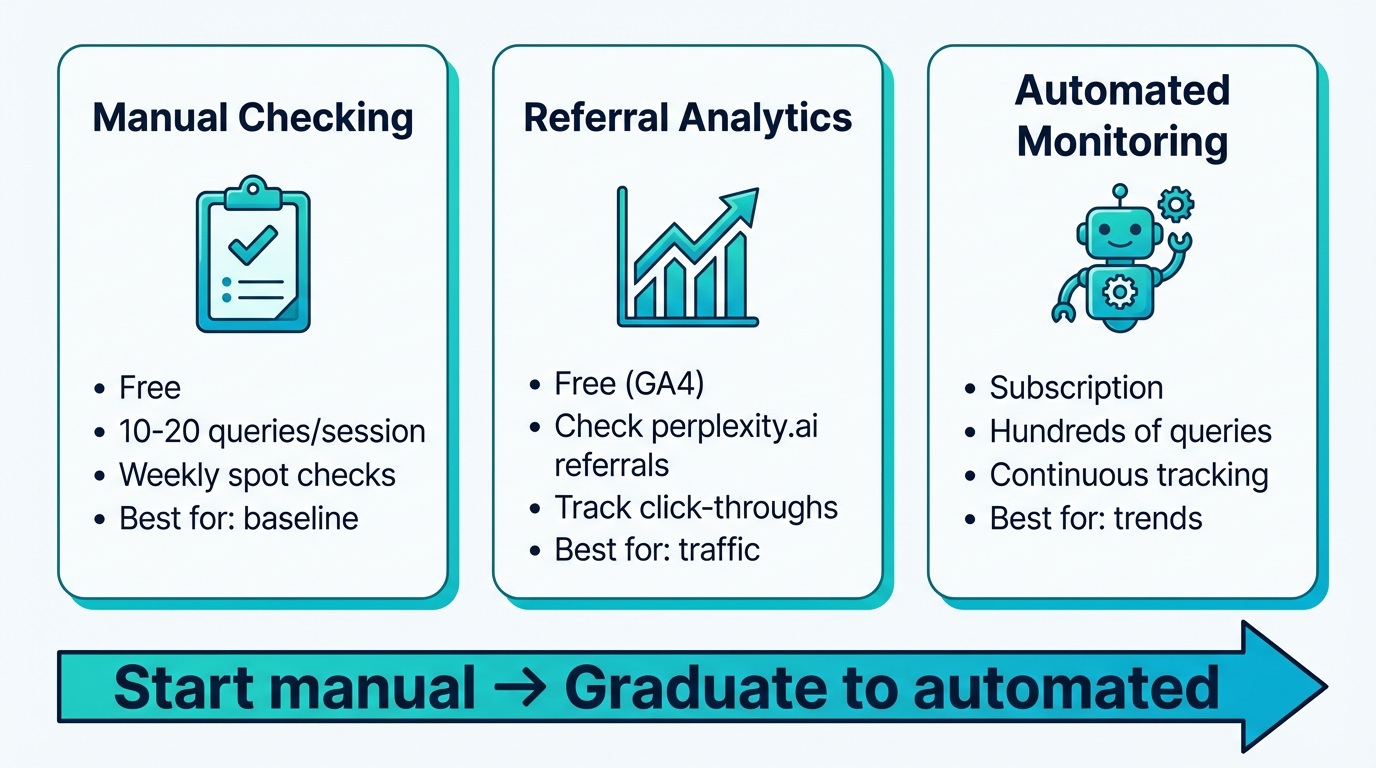
Manual checks are still the fastest way to get an initial picture.
A simple workflow: 1. Create a list of prompts across the five categories above. 2. Run each prompt in Perplexity. 3. Record: - Answer date - Whether your brand is mentioned - Whether your site is cited - Which URL is cited - Which competitors are mentioned or cited
Illustrative sample spreadsheet rows for Planway:
| Prompt | Planway mentioned? | Planway cited? | Cited URL | Competitors mentioned |
|---|---|---|---|---|
| "Best PM tools for remote teams" | No | Yes | planway.com/blog/async-collab | Asana, Monday, ClickUp |
| "Planway vs Asana" | Yes | Yes | planway.com/compare/asana | Asana, Monday |
| "Asana alternatives" | Yes | No | n/a | Monday, ClickUp, Notion |
| "What is Planway?" | Yes | Yes | planway.com/about | n/a |
| "Best tool for sprint planning" | No | No | n/a | Jira, Linear, Shortcut |
How to interpret this pattern: - Planway is present on branded and comparison queries. - Planway is weak on category and use-case prompts. - The cited URLs suggest which content types are currently doing the work.
Why manual tracking breaks down: - Prompt sets grow fast once you include products, subcategories, and geographies. - Comparing results over time becomes error-prone. - You will miss changes unless you run checks regularly.
Manual tracking is best for: - Initial baseline creation - Investigating a sudden change you noticed elsewhere (for example, a traffic spike from Perplexity referrals) - Reviewing how your brand is positioned in high stakes queries
Measuring Perplexity referral traffic in analytics
Because Perplexity citations are links, you can measure traffic when users click them.
In Google Analytics 4: - Look at Traffic acquisition and filter source/medium for entries containing "perplexity".
What this tells you: - Which landing pages received visits from Perplexity - Whether Perplexity is contributing meaningful sessions over time
What it does not tell you by itself: - Which prompt produced the click - Whether Perplexity mentioned your brand in the answer text - How often you were cited without being clicked
Use analytics as a complementary signal, not a complete visibility score.
Automated tracking options
As prompt volumes rise, automation becomes the only practical way to maintain a consistent view.
When evaluating tools for Perplexity monitoring, look for:
- Perplexity as a distinct provider, not merged into a generic bucket that hides citation mechanics
- Citation-level outputs including cited URLs, not only brand text mentions
- Prompt-level history so you can compare the same question over time
- Competitor tracking on the same prompt set
- Exportability so marketing and SEO teams can act on it in their existing workflows
Tools in this space include friction AI, Otterly, and Profound. Capabilities vary by product and plan, so validate the specific Perplexity outputs you need before you commit.
If your team has engineering resources, the Perplexity API can be used to build internal tracking pipelines, but you still need to define prompts, normalize outputs, and maintain a change log.
Setting up a Perplexity tracking workflow
A workable workflow connects three parts: prompts, measurement cadence, and action rules.
Choose your prompts
Start with 15 to 25 prompts across the five categories. Keep them stable for an initial baseline period, then expand.
Guidelines: - Include your highest value category and use-case queries, not only branded prompts. - Add a small number of uncertain prompts where you suspect competitors are stronger. Those gaps often create the clearest roadmap.
Illustrative example: - Planway tracks "best tool for sprint planning" and finds no mention and no citations. That signals a content and positioning gap rather than a brand awareness gap.
Set a cadence that matches how fast you need to react
Avoid hard rules like weekly minimum or daily ideal. Instead choose based on: - How competitive your category is - How often you publish or update content - How quickly you need to detect displacement on priority prompts
A common approach is: - Higher frequency checks for a small set of high value prompts - Lower frequency checks for a broader prompt library
Establish a baseline before you change content
Run your prompt set for a baseline window long enough to compare against, then document: - Mention rate by prompt category - Citation presence and which URLs are cited - Competitor presence patterns - Any early relationship between citations and referral traffic
Monitor for shifts that require action
Watch for: - New coverage: your brand or pages appear where they did not before - Loss of coverage: you disappear from prompts you previously owned - Competitor source replacement: the answer text still includes you, but citations shift to competitor pages, or the reverse
Turning tracking into action
Use tracking signals to decide what to build, fix, or update. These are decision patterns rather than universal rules.
If you are not being cited at all
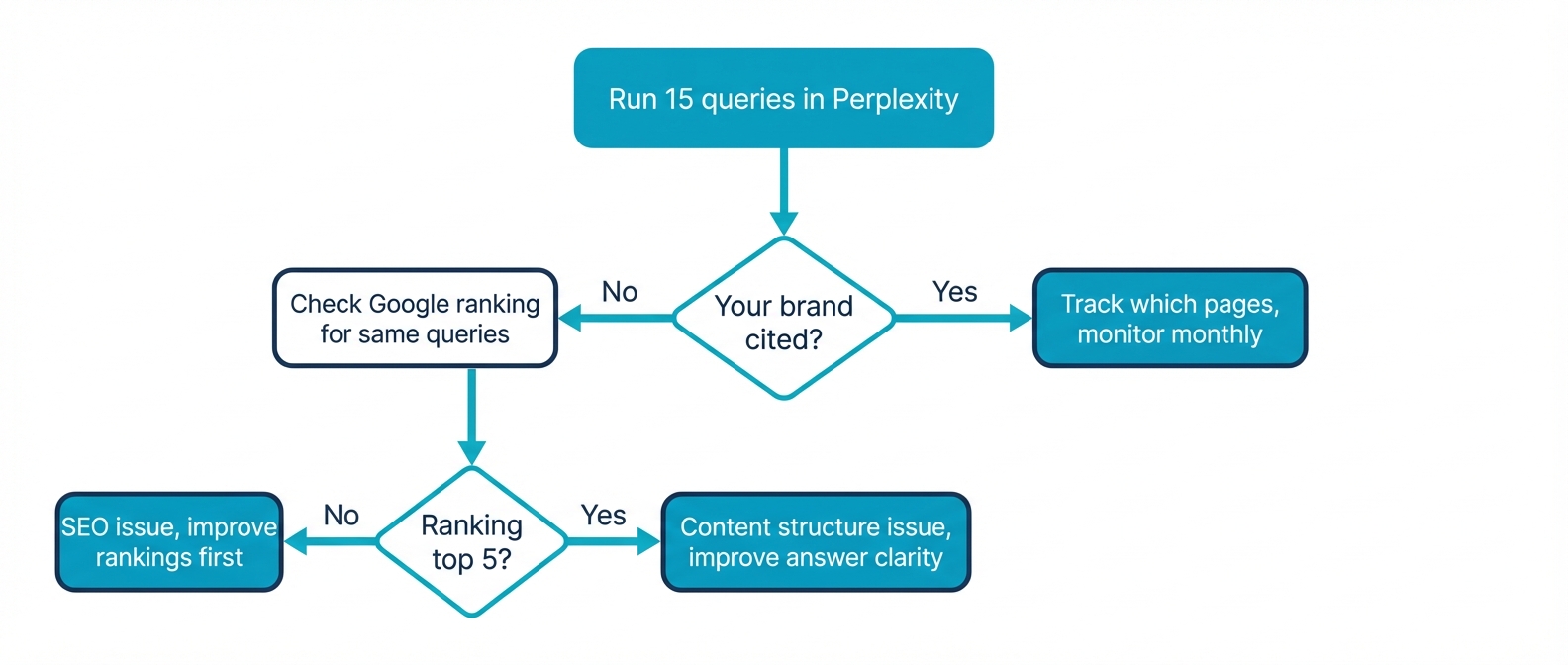
Likely causes to investigate: - Crawl accessibility and indexability issues - Missing content for the specific query intent - Your pages are not competitive in the underlying web results Perplexity retrieves
What to do: - Start with the fundamentals in How to get cited and mentioned in Perplexity AI. - Create intent-matched pages for your priority use cases and comparisons rather than only broad thought leadership.
If you are cited but not mentioned
What it might mean: - Your page is useful as background, but other brands are more directly framed as solutions in the narrative.
What to do: - Review the cited competitor sources in the same answer to see what they make easy for Perplexity to extract: definitions, comparisons, constraints, and plain-language positioning. - Update the cited page so it clearly answers the query intent and states your relevance without forcing marketing claims.
If you are mentioned but your site is not cited
What it might mean: - Perplexity is relying on third-party sources to describe you.
What to do: - Identify which third-party pages are being cited and whether they are accurate. - Publish or improve pages that are appropriate sources for the queries where you want first-party citations, such as comparison pages, pricing explainers, integration docs, and use-case guides.
If your citations are concentrated on one page
Why it is risky: - A single page becoming the source for most citations creates a fragile visibility profile.
What to do: - Build supporting pages for adjacent intents so you have multiple credible sources across prompts. - Strengthen internal linking so Perplexity can reach relevant pages from the cited hub content.
Hypothetical example: estimating impact without inventing results
If Planway improves a use-case page and begins earning citations on a prompt that previously had none, you might later see an increase in Perplexity referral sessions to that page. The size of that increase depends on user behavior and how often users click citations, so treat analytics changes as confirmation signals, not guaranteed outcomes.
For more on connecting citations to sources over time, see How to monitor when AI platforms cite your brand.
Frequently asked questions
What metrics should I track for Perplexity visibility?
Track: - Brand mentions in the answer text - Citations to your domain and the specific cited URLs - Competitor presence in both answer text and citations - Positioning and tone labels you can apply consistently
Use referral traffic as a supplemental metric since clicks are required for visits.
How do I measure share of voice in Perplexity?
Use a stable prompt set for your category and record, per prompt: - Which brands are mentioned in the answer text - Which domains and URLs are cited
Share of voice can be summarized as the proportion of prompts where your brand is mentioned or cited compared with competitors, but keep the underlying per-prompt details so you can act on the drivers.
Can I track Perplexity citations in Google Analytics?
You can measure referral traffic from Perplexity in GA4 by filtering traffic acquisition source/medium for "perplexity". This captures clicks from citations, not total mentions or total citations.
What is the difference between PerplexityBot and Perplexity-User?
Perplexity documents: - PerplexityBot for indexing pages for Perplexity search results - Perplexity-User for fetching a page in response to a user request
This distinction is useful when diagnosing whether a page can be retrieved and used as a source.
When should I automate Perplexity tracking?
Automate when: - Your prompt set is large enough that manual checks become inconsistent - You need prompt-level history and competitor comparisons - You want to monitor cited URLs over time rather than only mentions
CTA: track Perplexity and other AI providers with consistent prompt sets
If you need a repeatable workflow across Perplexity plus other AI providers, friction AI supports multi-provider tracking with prompt-level monitoring and citation-oriented analysis. Validate that the features match your reporting needs and team workflow before adopting any platform.
Last verified: July 26, 2026